一、MCP Server开发
1.环境搭建
可以参考MCP官网[1]搭建开发MCP Server的环境:
1)安装uv
1
| $ curl -LsSf https://astral.sh/uv/install.sh | sh
|
2)创建项目
1
2
3
4
5
6
7
8
9
10
11
12
13
| # Create a new directory for our project
$ uv init mytool
$ cd mytool
# Create virtual environment and activate it
$ uv venv
$ source .venv/bin/activate
# Install dependencies
$ uv add "mcp[cli]" httpx
# Create our server file
$ touch mytool.py
|
自定义一个简单的算法[4],两个数字 a 和 b,最后直接返回 a×15+b 的结果。
1
2
3
4
5
6
7
8
9
10
11
12
13
14
15
16
17
18
19
20
21
22
23
24
25
26
27
28
29
30
31
32
| from mcp.server.fastmcp import FastMCP
from typing import Dict, Any
mcp = FastMCP("mytool")
@mcp.tool()
async def odd_algorithm(a: int, b: int) -> Dict[str, Any]:
'''
处理两个输入数字并返回经过奇怪算法得到的结果
Args:
a (int): 第一个输入数字
b (int): 第二个输入数字
Returns:
Dict[str, Any]: 包含结果等信息的字典
'''
data = {
"a": a,
"b": b
}
result = {
"result": a * 15 + b,
"data": data
}
return result
if __name__ == "__main__":
mcp.run(transport="stdio")
|
异步函数中的多行注释很重要,不仅是给自己看的,也是给mcp client看的,这样工具才能更好的知道这个server是干什么的。
二、MCP Client开发
MCP Client相对Server要复杂一些,在参考MCP官网文档[2]时,例子中用的是Anthropic的API,国内用不了,后来又参考了一篇知乎文章[5],文章中用的是openai的client.chat.completions.create,openai官网[3]用的是client.responses.create,这两个API的参数tool格式不太一样,一开始没注意到是API的差别,在格式上迷惑了好一会。参考openai官网[6],responses能力更多,更推荐使用。所以最终的client整合了[2][3][5]:
1
2
3
4
5
6
7
8
9
10
11
12
13
14
15
16
17
18
19
20
21
22
23
24
25
26
27
28
29
30
31
32
33
34
35
36
37
38
39
40
41
42
43
44
45
46
47
48
49
50
51
52
53
54
55
56
57
58
59
60
61
62
63
64
65
66
67
68
69
70
71
72
73
74
75
76
77
78
79
80
81
82
83
84
85
86
87
88
89
90
91
92
93
94
95
96
97
98
99
100
101
102
103
104
105
106
107
108
109
110
111
112
113
114
115
116
117
118
119
120
121
122
123
124
125
126
127
128
129
130
131
132
133
134
135
136
137
138
139
140
141
142
143
144
145
146
147
148
149
150
151
152
153
154
155
156
157
158
159
160
161
162
163
164
165
166
167
168
169
170
171
| import asyncio
import sys
import json
import signal
from typing import Optional, List
from contextlib import AsyncExitStack
from mcp import ClientSession, StdioServerParameters
from mcp.client.stdio import stdio_client
from openai import OpenAI
API_CONFIG = {
"api_key": "sk-******",
"api_base": "https://api.openai.com/v1",
"model": "gpt-4.1-mini"
}
class MCPClient:
def __init__(self):
self.session: Optional[ClientSession] = None
self.exit_stack = AsyncExitStack()
self.pending_tasks: List[asyncio.Task] = []
self.client = OpenAI(
api_key=API_CONFIG["api_key"],
base_url=API_CONFIG["api_base"]
)
async def connect_to_server(self, server_script_path: str):
"""连接到MCP服务器"""
is_python = server_script_path.endswith('.py')
is_js = server_script_path.endswith('.js')
if not (is_python or is_js):
raise ValueError("服务器脚本必须是.py或.js文件")
command = "python" if is_python else "node"
server_params = StdioServerParameters(
command=command,
args=[server_script_path],
env=None
)
stdio_transport = await self.exit_stack.enter_async_context(stdio_client(server_params))
self.stdio, self.write = stdio_transport
self.session = await self.exit_stack.enter_async_context(ClientSession(self.stdio, self.write))
await self.session.initialize()
response = await self.session.list_tools()
tools = response.tools
print("\n已连接到服务器,可用工具:", [tool.name for tool in tools])
async def process_query(self, query: str) -> str:
"""使用OpenAI兼容API和可用工具处理查询"""
messages = [
{
"role": "user",
"content": query
}
]
response = await self.session.list_tools()
available_tools = [{
"type": "function",
"name": tool.name,
"description": tool.description,
"parameters": tool.inputSchema
} for tool in response.tools]
try:
response = self.client.responses.create(
model=API_CONFIG["model"],
input=messages,
tools=available_tools
)
final_text = []
tool_call = response.output[0]
tool_name = tool_call.name
tool_args = json.loads(tool_call.arguments)
result = await self.session.call_tool(tool_name, tool_args)
final_text.append(f"Calling {tool_call.name}, parameters {tool_call.arguments}")
tool_result = json.loads(result.content[0].text)
messages.append(tool_call)
messages.append({
"type": "function_call_output",
"call_id": tool_call.call_id,
"output": str(tool_result['result'])
})
try:
second_response = self.client.responses.create(
model=API_CONFIG["model"],
input=messages,
tools=available_tools
)
final_text.append(second_response.output_text)
except Exception as e:
final_text.append(f"获取最终响应时出错: {str(e)}")
print(f"获取最终响应时出错: {str(e)}")
return "\n".join(final_text)
except Exception as e:
return f"API调用出错: {str(e)}"
async def chat_loop(self):
"""运行交互式聊天循环"""
print("\nMCP客户端已启动!")
print("输入您的查询或'quit'退出。")
while True:
try:
query = input("\n查询: ").strip()
if query.lower() == 'quit':
print("正在清理并退出...")
break
response = await self.process_query(query)
print("\n" + response)
except Exception as e:
print(f"\n错误: {str(e)}")
import traceback
traceback.print_exc()
async def cleanup(self):
"""清理资源,简化版本,避免与anyio冲突"""
try:
await self.exit_stack.aclose()
except Exception as e:
print(f"清理过程中出现异常 (可以忽略): {str(e)}")
async def main():
if len(sys.argv) < 2:
print("用法: python mcpclient.py <服务器脚本路径>")
sys.exit(1)
client = MCPClient()
try:
await client.connect_to_server(sys.argv[1])
await client.chat_loop()
finally:
await client.cleanup()
if __name__ == "__main__":
try:
asyncio.run(main())
except KeyboardInterrupt:
print("\n用户中断,程序退出")
except asyncio.CancelledError:
print("程序被取消,正常退出")
except Exception as e:
print(f"程序异常退出: {str(e)}")
import traceback
traceback.print_exc()
|
另外值得一提的是,openai官网使用的function calling,和mcp的格式非常类似,mcp可以模块化的处理格式相关的内容,而且可以根据模型返回的结果动态调用所需的函数,openai官网的例子是静态调用的函数。
三、运行
1.使用自定义client运行
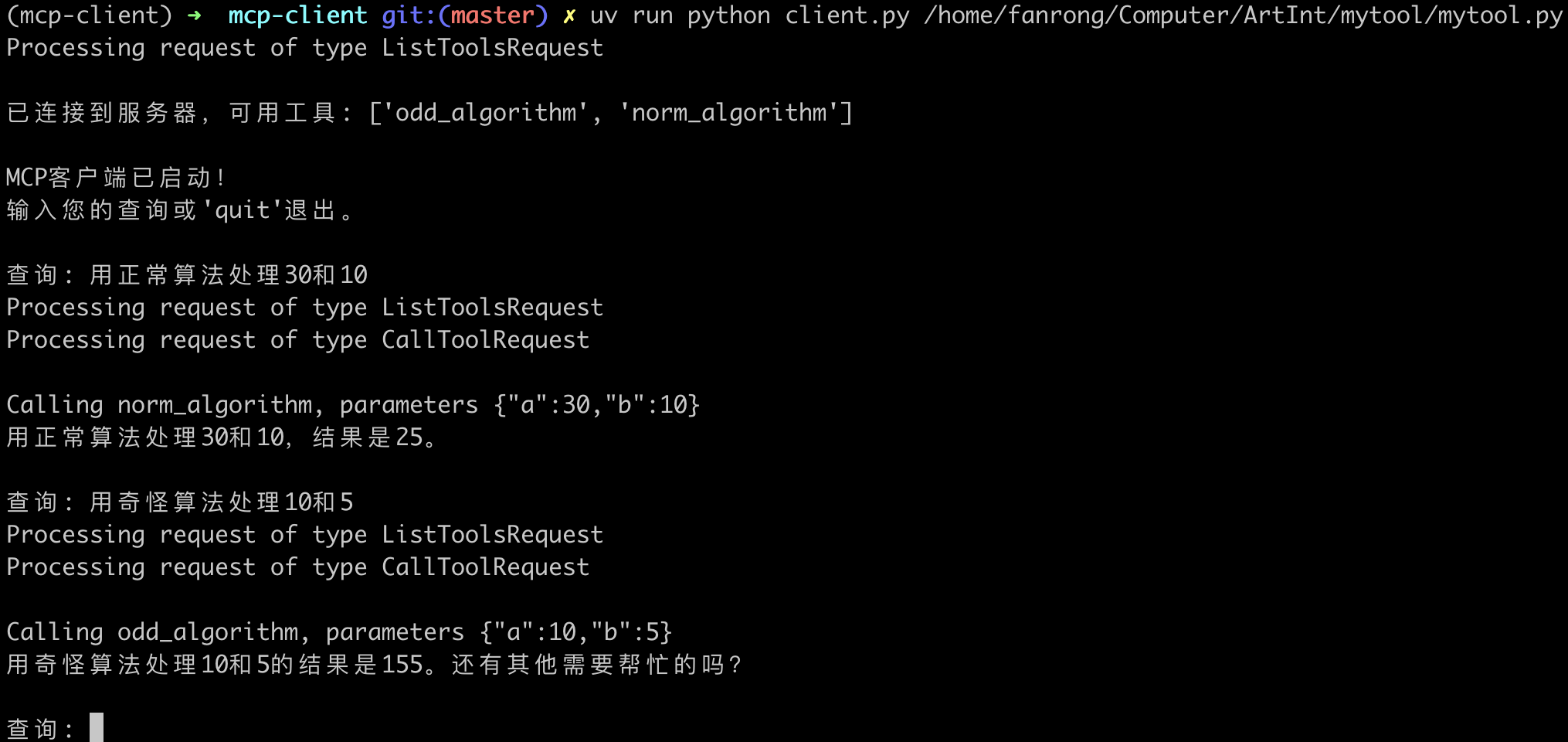
为了能看出client根据大模型返回的结果动态选择函数进行调用的效果,可以再添加一个norm_algorithm MCP Server进行测试:
2.使用其他client运行
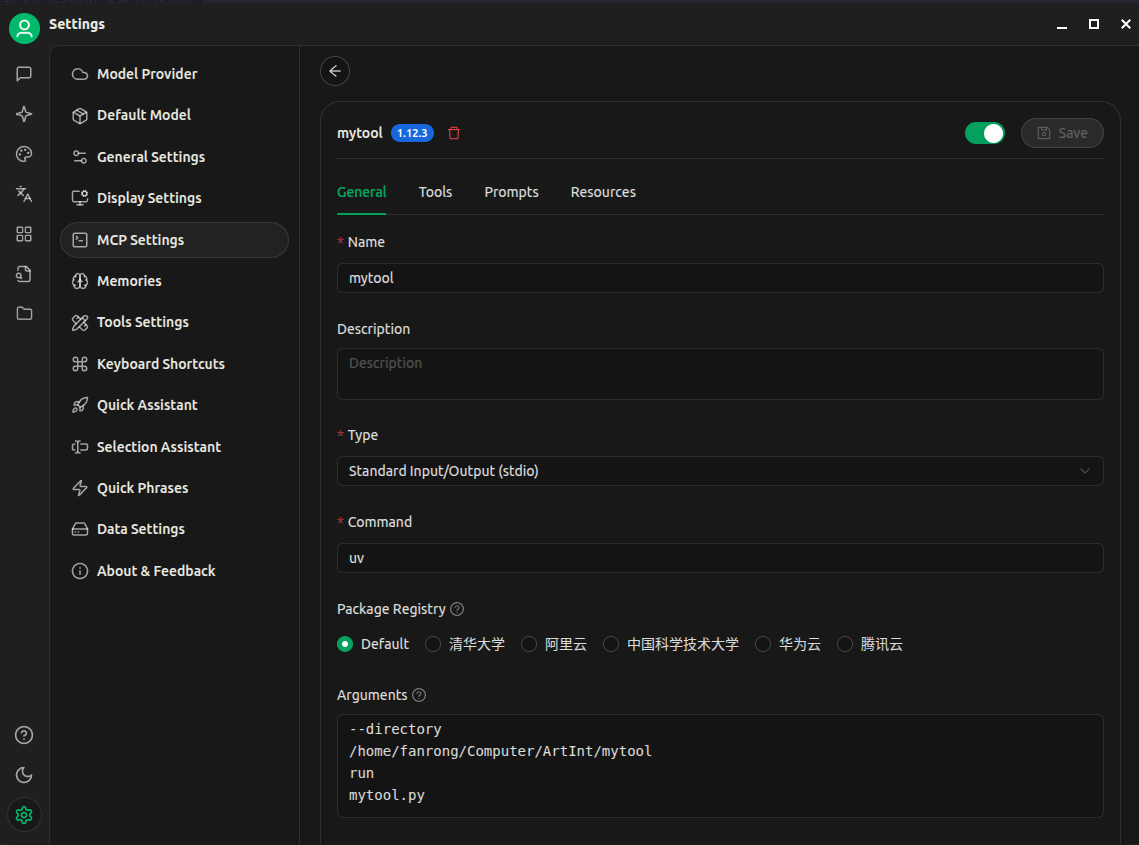
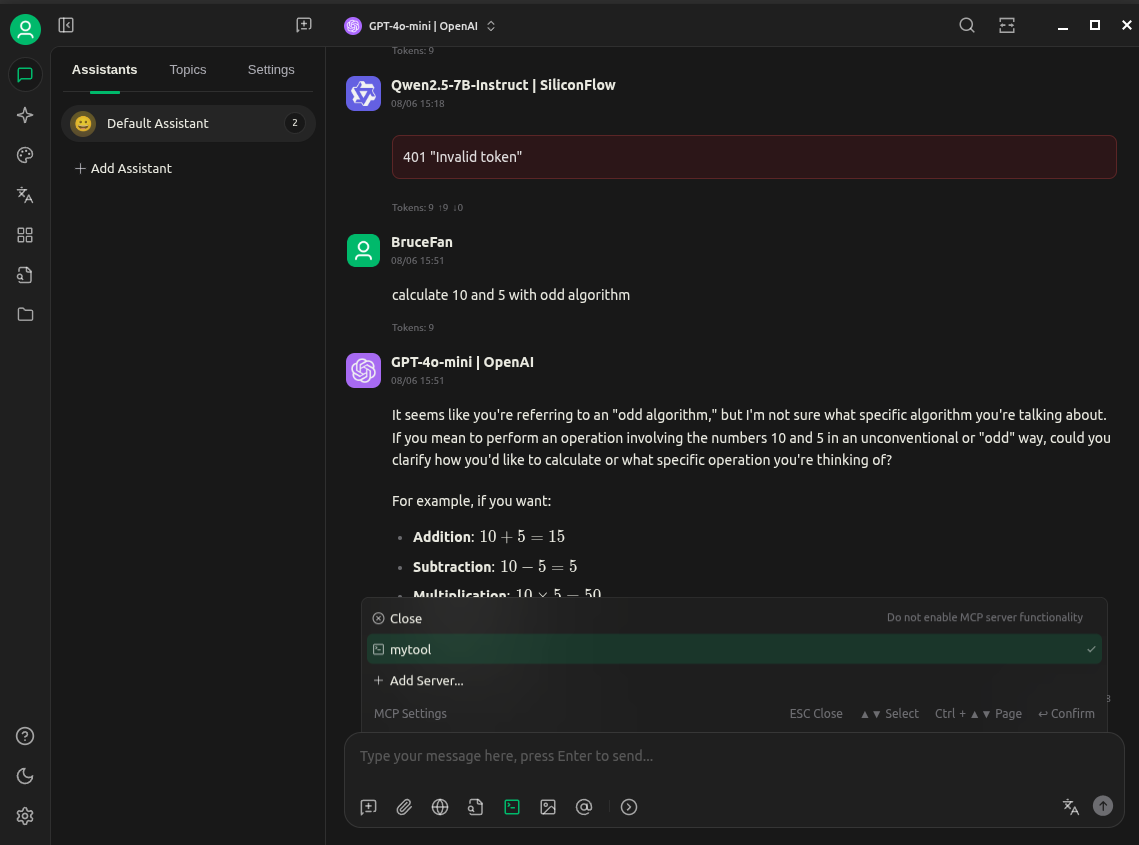
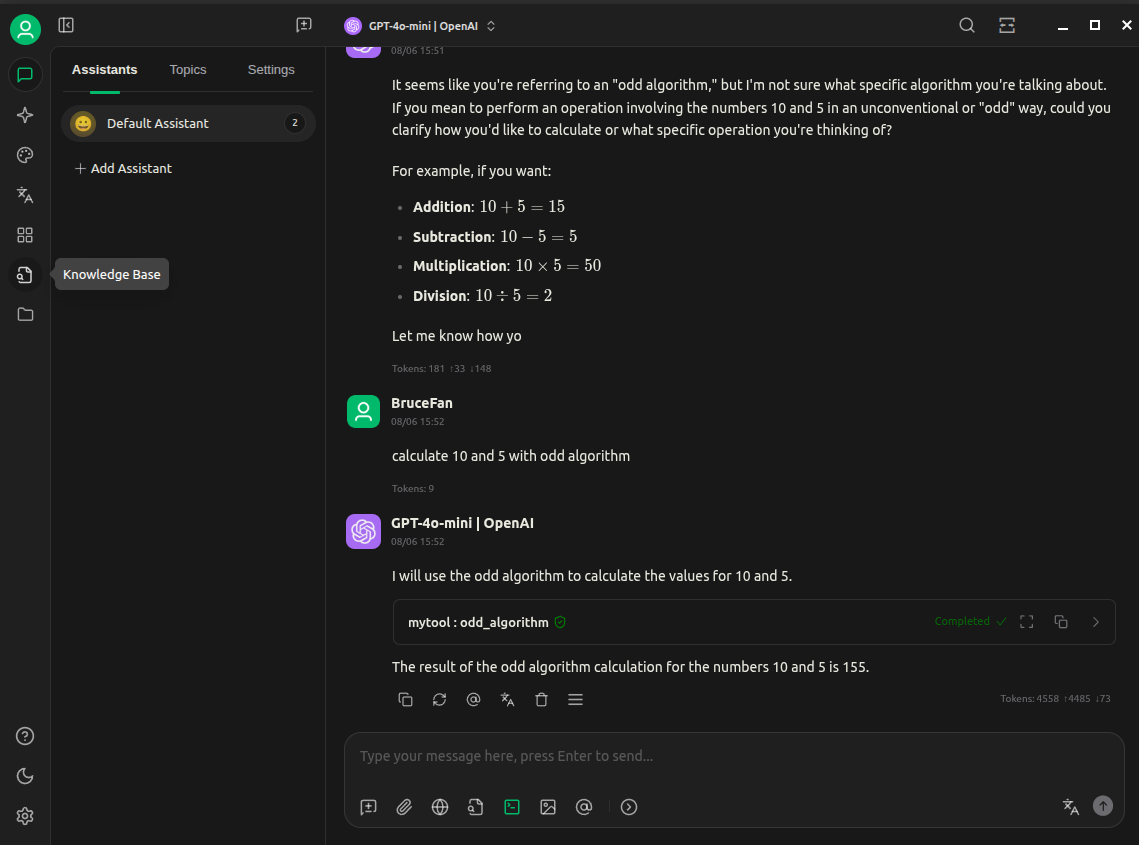
这里使用cherry studio,其他mcp client也可以自行尝试:
总结
在这个简单场景中,Function Calling和MCP非常类似,看不出太大区别,但是在多模型协作、对话状态管理、复杂工作流等复杂、多步骤的智能体交互场景中就需要MCP进行实现了。
参考:
[1] Build an MCP Server
[2] Build an MCP Client
[3] Function calling
[4] 一个脚本,一个mcp server
[5] 创建一个简单的mcp client
[6] Responses vs. Chat Completions